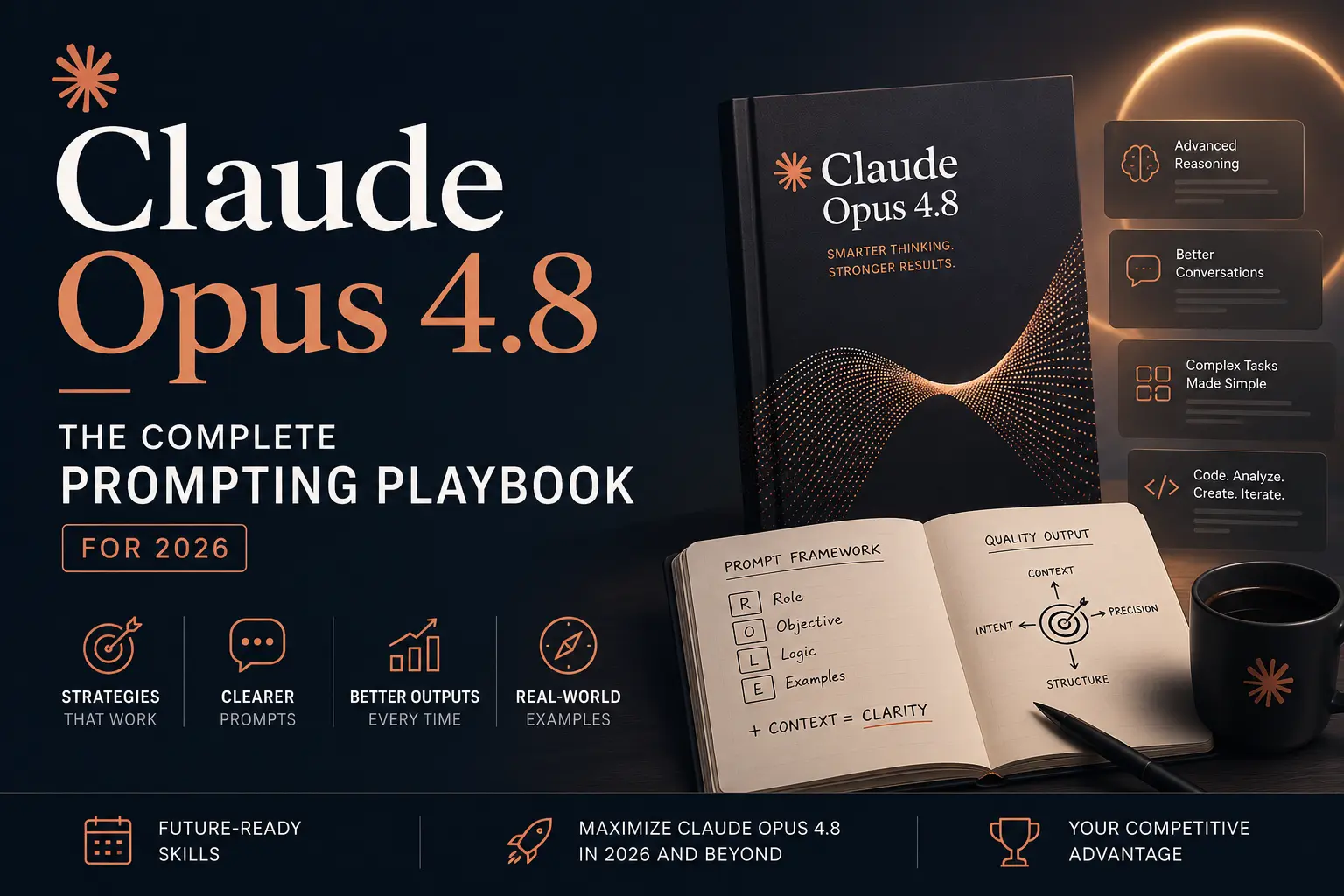
For agencies and operators building on AI, the model you prompt matters less than how you prompt it. Claude Opus 4.8 was Anthropic's most capable generally available model when we first published this playbook in May 2026, and most people still leave much of its capability on the table because they never set the variables that actually control output quality.
Anthropic has shipped newer models since then. Claude Fable 5.1 is now its most capable widely released model, and Claude Opus 5.5, Sonnet 5.5 and Haiku 5.5 are the current Opus, Sonnet and Haiku. Opus 4.8 is still available in the API. This edition checks every setting against Anthropic's own Opus 4.8 prompting guide, and adds four prompt templates for GEO work, a troubleshooting table, what changes when you move these prompts to the Claude 5 models, and a FAQ.
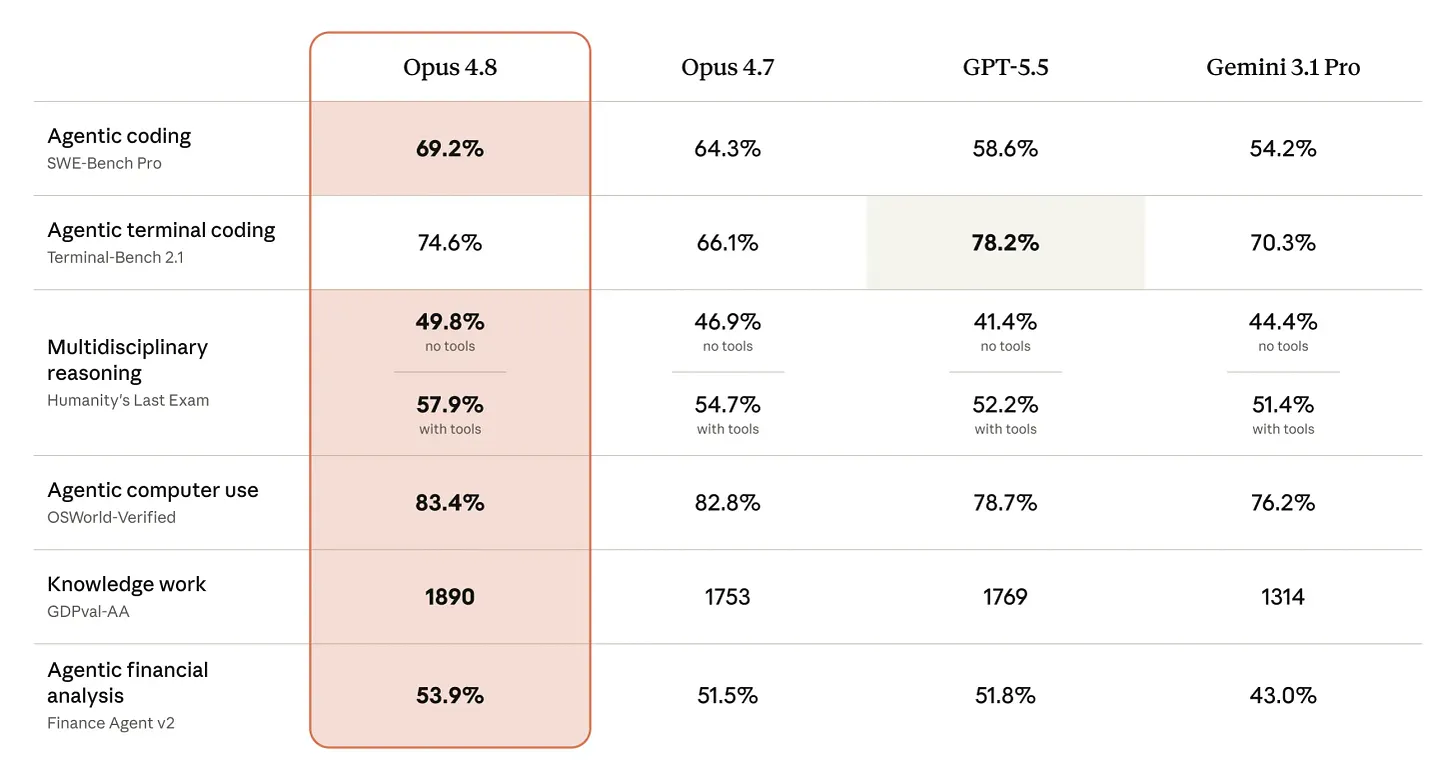
Anthropic positions Opus 4.8 as an upgrade on Opus 4.7 with improvements across benchmarks and as a more effective collaborator, at the same price point. The framing is clear: 4.8 builds on 4.7's foundation rather than breaking from it. The prompting instincts you developed still apply — but there are meaningful new capabilities, and one genuinely new paradigm, that change what's achievable if you know how to use them.
The biggest addition is Dynamic Workflows in Claude Code: the ability for Claude to write its own orchestration scripts, spin up parallel subagents, and scale test-time compute trivially. We'll cover all of it below — the effort stack, XML structure, honesty directives, and the workflow paradigm.
This is the same framework we use at Fade Digital to run GEO research, build client deliverables, and pressure-test strategy. Below is everything you need to get the best output this model can produce, every single time.
Choose the right model
Before writing a single word of your prompt, choose the right model. When this playbook first ran, the choice was Opus 4.8, Sonnet 4.6 or Haiku 4.5. Here is Anthropic's API lineup as of October 2026, with list prices from Anthropic's pricing page:
| Model | Best for | Input / output, per million tokens |
|---|---|---|
| Claude Fable 5.1 | The hardest long-horizon reasoning and agent work | $10 / $50 |
| Claude Opus 5.5 | Deep analysis, research and complex agent tasks (the current Opus) | $4 / $20 |
| Claude Opus 4.8 | The model this playbook was written for, still available | $5 / $25 |
| Claude Sonnet 5.5 | Most everyday work: drafting, coding and agents at speed | $2 / $10 |
| Claude Haiku 5.5 | High-volume simple tasks: classification, extraction, short summaries | $0.10 / $0.50 (prompts up to 100K tokens) |
One thing the table makes plain: Opus 5.5 costs less per token than Opus 4.8. For new API work it is usually the better Opus, and the section on moving these prompts to the Claude 5 models covers what to change. For how Claude compares with OpenAI's models, see our ChatGPT vs Claude comparison, and for what Fable means in everyday use, our Claude Fable 5 explainer.
Start with Sonnet. Move to Opus when the task needs real depth, or when you're running a long agent task that has to stay coherent. Save Fable 5.1 for the long, high-value jobs that justify its price. Drop to Haiku when speed and volume matter more than depth.
The framework
Anthropic's documentation describes a hierarchy of techniques ordered by impact. Most people jump straight to advanced techniques and skip the fundamentals. That's backwards. Here's the framework in the order that matters, updated for the specific behaviors of Opus 4.8.
Set the effort level (most important)
This is the single most important variable in your prompt, and most people never set it at all.
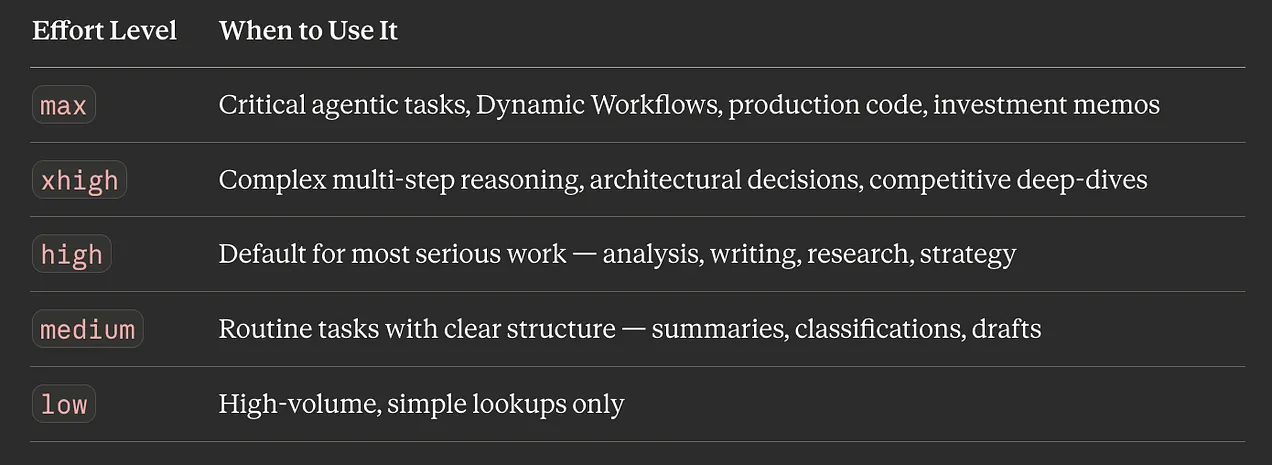
The effort parameter controls how much intelligence the model applies to a task. Like 4.7, Opus 4.8 respects effort levels strictly, especially at the low end. The system remains: low, medium, high (default), xhigh, and max.
What Anthropic recommends for 4.8: start at xhigh for coding and agent work, and use at least high for anything that needs real thinking. In the API, leaving effort unset means high. Thinking is off until you set thinking: {"type": "adaptive"}, so turn it on for hard tasks.
In the API:
client.messages.create(
    model="claude-opus-4-8",
    max_tokens=64000,
    thinking={"type": "adaptive"},
    output_config={"effort": "xhigh"},
    messages=[{"role": "user", "content": "..."}],
)
When running at max or xhigh, give the model room: Anthropic suggests starting max_tokens at 64k and tuning from there, so it can think and act across tool calls and subagents. Stream large responses so a long answer doesn't hit a request timeout.
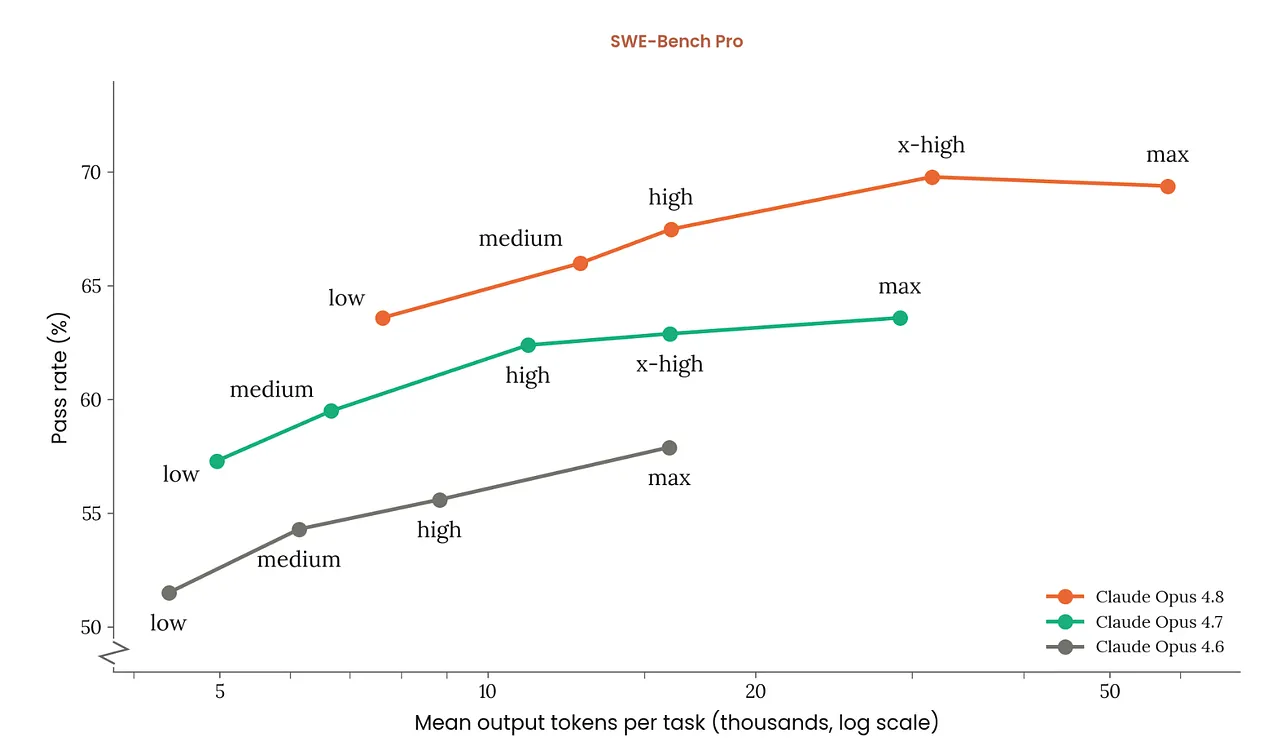
Effort matters more here than on any earlier Opus, in Anthropic's words. At low and medium, Opus 4.8 scopes its work tightly to what you asked rather than going further, which is good for speed and cost and risky on anything that needs several steps of reasoning. max can add quality on the hardest problems, but Anthropic notes diminishing returns and a tendency to overthink, so test it rather than defaulting to it.
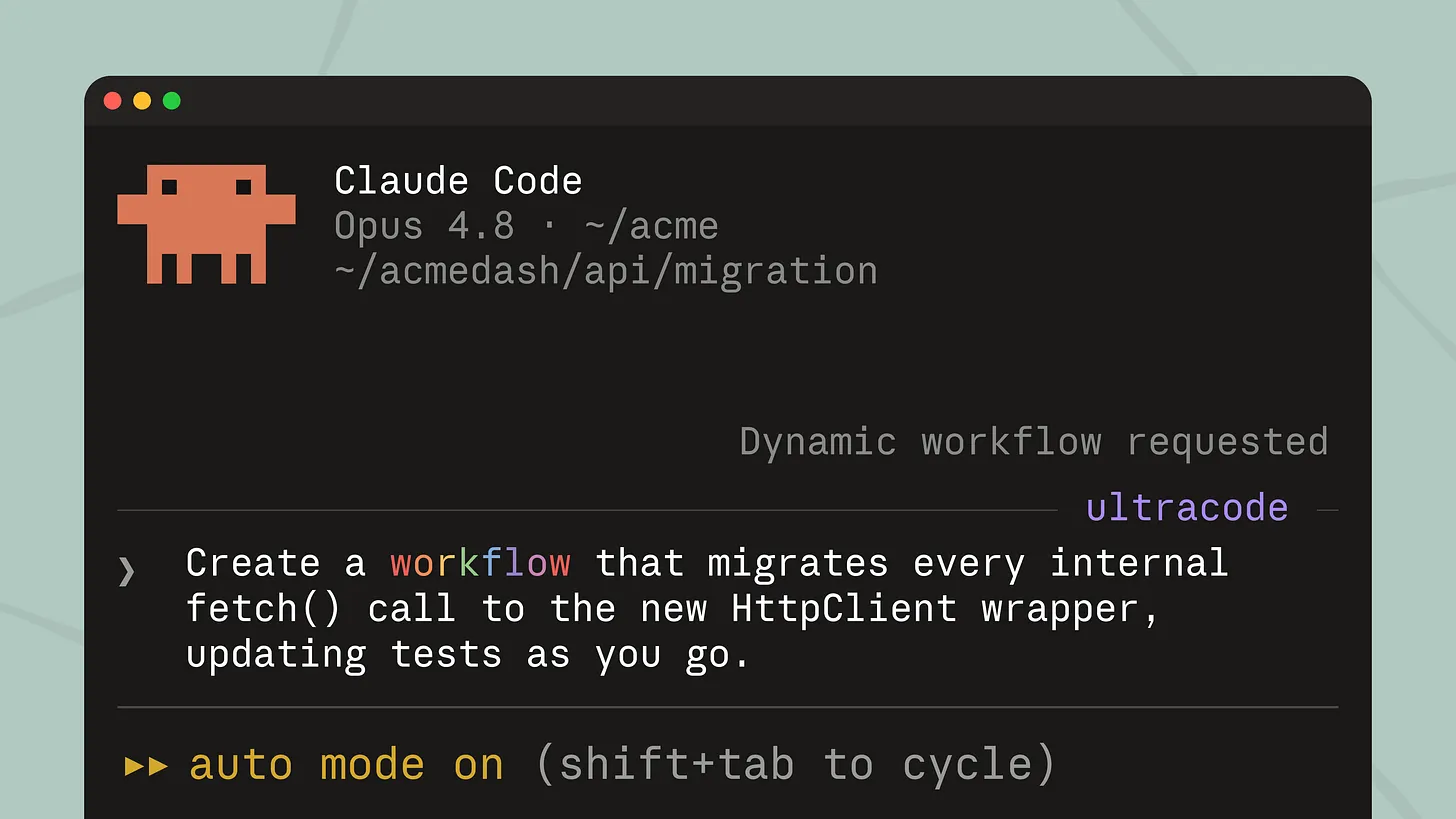
In Claude Code, putting the keyword ultracode in a prompt tells Claude to run that task as a workflow, and ultracode can also stay on for a whole session. More on workflows below.
If you see shallow reasoning on a complex task, raise the effort level before changing your prompt. Anthropic's guide gives the same advice. If you have to stay at low for speed, add: "This task involves multistep reasoning. Think carefully through the problem before responding."
Be specific — more than you think
The single highest-leverage prompting move is specificity. Opus 4.8, like 4.7, is extremely literal. Vague prompts get scoped, not generalized. If you want an instruction applied across all sections — not just the first — you have to say so. If you want exceptional output, you have to request it explicitly.
Anthropic's guide puts it plainly: Opus 4.8 "does not silently generalize an instruction from one item to another, and it does not infer requests you didn't make." The upside is precision and predictable output in pipelines.
Think of your prompt as instructions to a brilliant but literal new hire on their first day. They'll do exactly what you say, so say exactly what you mean.
Weak prompt:
Write about market positioning.
Strong prompt:
Analyze the 3 most effective market positioning strategies for B2B
service businesses in a crowded category. For each strategy, explain
what's driving its effectiveness, provide one specific company example,
and assess whether it's likely to strengthen or weaken over the next
18 months. Apply this framework to all three strategies, not just
the first.
The difference isn't more words. It's more specificity, explicit scope, and a format directive at the end.
Use XML tags for structure
This is Claude's structural superpower, and still almost nobody uses it correctly. Anthropic recommends XML tags for separating the parts of a prompt, and Claude reads them as structural markers. When your prompt has multiple components (context, instructions, data, constraints, output format), XML tags prevent Claude from mixing them up.
<context>
You are helping me evaluate a new service line for a dental practice
currently doing $2.4M in annual revenue, growing 15% year over year.
</context>

<instructions>
Analyze the three key risks that most commonly derail practices
expanding into a new service line at this stage.
For each risk, explain the warning signs and what an owner should
be doing to mitigate them.
Apply this analysis to all three risks, not just the most obvious one.
</instructions>

<constraints>
- Be direct. Give me your honest assessment, not a balanced "it depends."
- Use specific examples from real businesses where possible.
- Flag any assumptions you're making.
- Maximum 600 words.
</constraints>
Claude sees the tags and immediately understands that <context> is background, <instructions> is the actual task, and <constraints> are the guardrails. Tag names are flexible — use whatever makes semantic sense: <background>, <rules>, <examples>, <output_format>. Consistency across your prompts matters more than the specific names.
Show Claude what good looks like
If one technique consistently separates good outputs from great ones, it's this: show Claude what good looks like. Instead of describing the tone, format, or style you want in abstract terms, provide two to three concrete examples. Claude pattern-matches against these far more reliably than it follows descriptive instructions alone.
<examples>
  <example>
    Input: "We need to cut 20% of the marketing budget"
    Output: "Reducing marketing spend by 20% requires prioritization
    across three areas: paid acquisition, agency retainers, and
    tooling licenses. Here's a phased approach that preserves our two
    highest-ROI channels..."
  </example>
</examples>

Now analyze this situation using the same approach:
"We need to extend our runway by 6 months without cutting headcount"
Anthropic recommends 3–5 examples for best results, wrapped in <example> tags so Claude can tell them apart from your instructions. You can also ask Claude to evaluate your examples for relevance and diversity, or to generate additional ones based on your initial set.
Prompt for visible reasoning
For complex problems requiring analysis, multi-step reasoning, or strategic judgment, telling Claude to work through its reasoning before producing a final answer dramatically improves accuracy. The simplest version: add "Think through this step by step before giving your final answer" to your prompt.
The more structured version uses tags to separate reasoning from output:
<instructions>
Evaluate whether we should expand into a new metro market this year.
Before giving your recommendation, work through the analysis inside
<analysis> tags.
Consider: market size and growth, competitive landscape, our current
operational capacity, and capital required vs. expected payback period.
Then provide your final recommendation with a clear resource
allocation suggestion.
</instructions>
Forcing visible reasoning prevents Claude from pattern-matching to the most likely answer and back-filling justification after the fact.
On 4.8, thinking is off until you set thinking: {"type": "adaptive"}. Once it is on, Claude decides when and how much to think, guided by the effort setting. A fixed budget_tokens returns an error on Opus 4.7 and later, so control depth with effort instead. If it thinks more than you want, which can happen with a large system prompt, Anthropic suggests telling it that thinking "should only be used when it will meaningfully improve answer quality."
Load rich context
Claude can only work with what you give it. The more relevant context you include, the more tailored and accurate the output becomes. Upload documents. Paste data. Provide company background. Share your goals. Explain your audience. Don't make Claude guess what you already know.
<background>
We're a home services company serving the Greater Toronto Area.
$4M annual revenue, ~30 staff, primarily HVAC and plumbing.
Our main competitors are large franchise operators and
independent contractors.
We differentiate on response time and transparent flat-rate pricing.
</background>

<data>
[Paste your quarterly metrics, customer feedback, or whatever's relevant]
</data>

<task>
Based on this context, identify our three biggest growth
opportunities for the next quarter.
</task>
For long documents (20k+ tokens), put the documents at the top of your prompt, above your instructions and query. In Anthropic's tests, putting the query at the end improved response quality by up to 30 percent, especially with complex, multi-document inputs.
Specify the output format
Don't leave the structure of Claude's response to chance. If you want a table, ask for a table. If you want a specific word count, state it. If you want an executive brief with defined sections, describe each section.
<output_format>
Respond with:
1. A one-paragraph executive summary (3-4 sentences max)
2. A comparison table with columns: Factor | Current | Target | Gap
3. A "Recommended Actions" section with 3 next steps, ranked by impact
</output_format>
Explicit format specs eliminate the most common frustration people have with AI: getting a 2,000-word essay when you wanted a concise brief, or getting bullet points when you needed flowing analysis.
Define constraints — especially the don'ts
Telling Claude what not to do is just as important as telling it what to do. Without constraints, Claude defaults to its training patterns, which can mean hedge-heavy output that sounds like a committee wrote it.
<constraints>
- Do NOT open with "In today's rapidly evolving landscape" or any variant
- Skip the preamble. Start with the most important insight.
- No bullet points — write in prose paragraphs
- If you're uncertain about a claim, flag it explicitly rather than
  hedging everything
- Maximum 500 words
- Be direct. I want your honest assessment, not a balanced "it depends."
</constraints>
Anthropic describes Opus 4.8's default voice as direct and opinionated, with little validation-style phrasing. That suits strategy memos. If your brand voice is warmer, say so: "Use a warm, collaborative tone. Acknowledge the user's framing before answering." If you get hedging on a legitimate business task, state the purpose: "This analysis is for an internal strategy memo. Give a direct assessment."
Control verbosity
Opus 4.8 calibrates response length to how complex it judges the task to be — short on simple lookups, much longer on open-ended analysis. If your use case requires specific verbosity, tune it explicitly.
To decrease verbosity: "Provide concise, focused responses. Skip non-essential context and keep examples minimal."
To increase depth: "This is for a board-level review. Go deep on every dimension — don't compress the analysis."
Positive examples showing appropriate concision work better than negative instructions like "don't be verbose." Show Claude a response at the length and depth you want, and it will match that pattern far more reliably than it follows abstract length instructions.
Use Dynamic Workflows (the new paradigm)
This is new to the Opus 4.8 era, and it's the most powerful capability yet.
What it is: Dynamic Workflows in Claude Code let Claude write its own orchestration script that runs dozens of subagents, instead of making tool calls one at a time. The control flow is code, which means Claude won't drift or forget halfway through thousands of files. The harness is encoded.
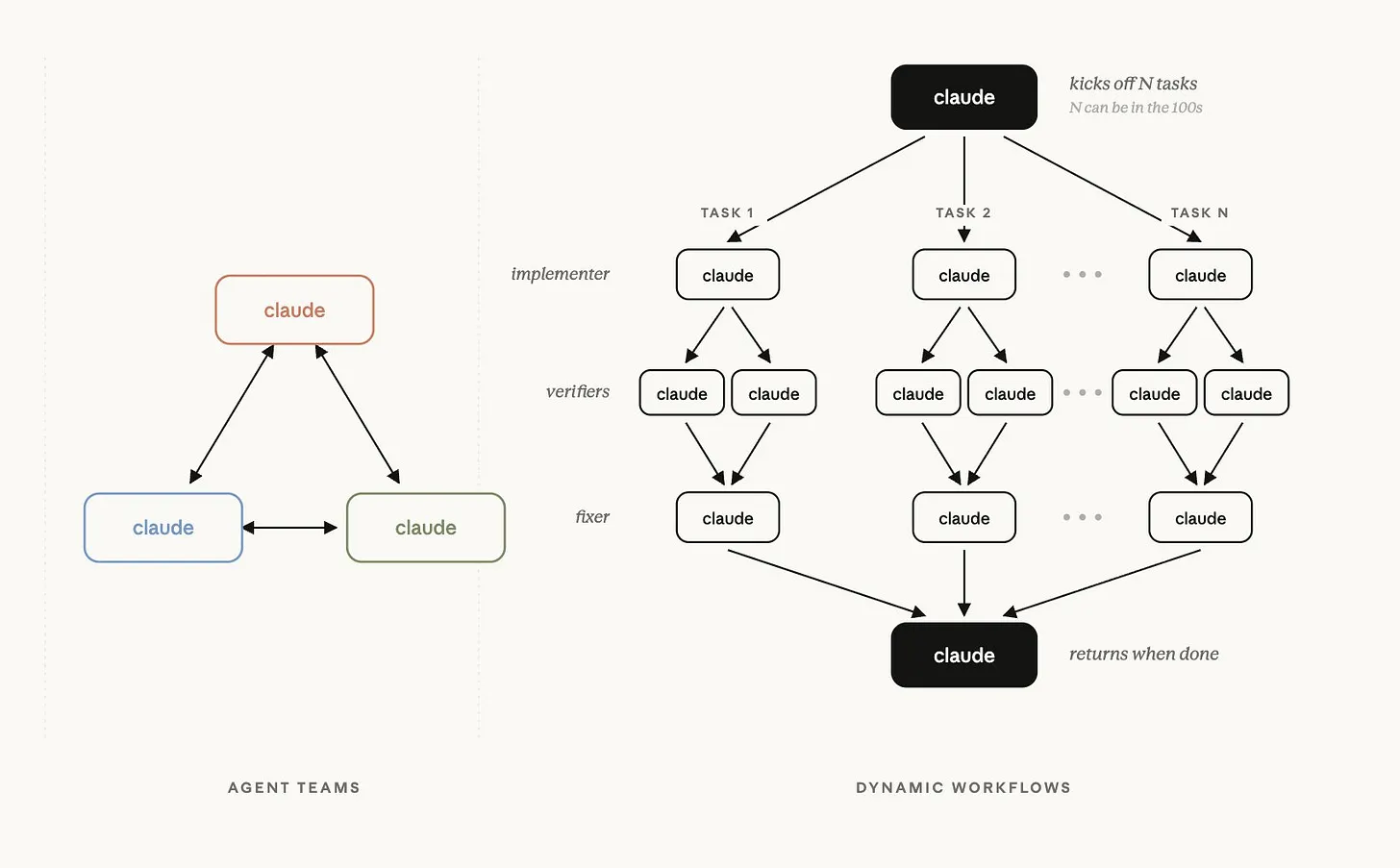
How it works: Ask for one in plain words ("use a workflow", "run a workflow"), or put the keyword ultracode in your prompt. Claude Code only starts a workflow when you opt in like this, because a run can use a lot of tokens. A workflow you want to reuse can be saved in your repository and run by name later.
What it adds:
- Parallel execution: research-heavy jobs split across agents that run at the same time, so they finish sooner than one agent working through them in order.
- Adversarial verification: route critical work through judges that each attack the output from a different angle. You can go as far as a tournament-style bracket that scores competing plans against each other.
- More compute where it counts: run several attempts or several reviewers on the same problem and keep the best, without writing the orchestration yourself.
- Reusable automation: because workflows are scripts under the hood, you can save them, commit them to your repo, share them with your team, and turn them into skills.
Workflows can get expensive because every parallel agent uses its own tokens. Get a feel for token usage on smaller tasks before you run one on a large job.
Best practices for Dynamic Workflows:
- Trigger intentionally. Ask for a workflow explicitly on important tasks. For routine work, leave workflows off to manage costs.
- Use ultracode for coding sprints. In a focused engineering session, keeping ultracode on saves you asking for a workflow every time.
- Use adversarial judges for critical outputs. Don't just generate; verify. Route the output through a judge agent with explicit attack criteria.
- Save your best workflows as skills. If a workflow solves a recurring problem well, commit it. That's institutional knowledge that compounds.
- Set a token budget before large tasks. Ask Claude to estimate token usage before running a large workflow, then decide whether the cost is justified.
- Tell it when to fan out. Anthropic's guide notes that Opus 4.8 spawns fewer subagents by default. Say when parallel work is wanted, for example: "Spawn multiple subagents in the same turn when fanning out across items or reading multiple files."
- Describe the outcome, not the orchestration. State the goal, the scope and what a finished result looks like, and let Claude decide how to split the work.
- Test on a sample first. On large codebases or research tasks, run the workflow on a representative 10% before committing to the full task.
For workflows that run on a schedule rather than inside a coding session, see how to build Claude workflows that run without you and Claude Dispatch.
Putting it all together
Here's what a properly structured Claude Opus 4.8 prompt looks like when you combine every technique above:
<context>
I run a multi-location service business ($8M revenue, 45 employees).
We're deciding whether to invest heavily in a new acquisition channel
now or optimize our existing channels for 18 months first.
Current cost per lead: trending up. Close rate: 22%. Payback: 8 months.
</context>

<instructions>
Analyze both options. Before giving your recommendation, work through
the trade-offs in <analysis> tags, considering:
- Current market conditions for our category
- Our metrics relative to typical benchmarks
- The risk/reward of investing now vs. optimizing first
- What we should use the 18 months to fix if we wait
Then provide a clear recommendation with a specific action plan.
Apply your analysis to both options equally — don't weight one by default.
</instructions>

<constraints>
- Be direct. Give me your honest read, not a balanced "it depends."
- Use specific benchmarks from comparable businesses where possible.
- Flag any assumptions you're making about market conditions.
- Keep the total response under 700 words.
</constraints>

<output_format>
1. Analysis (in <analysis> tags)
2. Recommendation (2-3 sentences, clear and direct)
3. 90-day action plan (5 specific actions, whichever path we choose)
</output_format>
This prompt is clear, structured, specific, and constrained. It tells Claude exactly what to do, how to think about it, what to avoid, and how to format the response. The output is categorically different from "Should I invest in a new channel now or wait?"
Four prompt templates for GEO work
The techniques above are general. Here is how they look on the work this blog is about: getting a business described correctly, and recommended, by AI assistants. Each template has the same parts: the material, the task, the constraints that matter and an exact output format. Paste real material where the brackets are.
1. Find the inconsistencies AI will repeat
Assistants describe a business from whatever they can find, and conflicting details across your site, your Google Business Profile and directories are where wrong answers start. We documented what that looks like in our test of ChatGPT on 10 local businesses.
<sources>
<website>[Paste the About, Contact and Services page text]</website>
<google_business_profile>[Paste name, address, phone, hours,
categories and description]</google_business_profile>
<directories>[Paste the same fields from 2-3 directory listings]</directories>
</sources>

<task>
Compare every fact that appears in more than one source: business name,
address, phone, hours, services, service area, founding year and
practitioner names. List every mismatch, including small ones like
suite numbers and abbreviations.
</task>

<constraints>
- Only use facts that appear in the sources. Do not fill gaps.
- If a fact appears in one source only, list it under "Single source".
</constraints>

<output_format>
A table with columns: Fact | Website | Google Business Profile |
Directories | Mismatch (yes/no). Then the three fixes that would remove
the most conflicts, most important first.
</output_format>
Fixing what it finds is the entity work covered in the AI Knowledge Graph Playbook.
2. Draft schema markup from a page, facts only
<page>[Paste the full text of one service or location page]</page>

<task>
Write JSON-LD for this page: a LocalBusiness (or the most specific
schema.org subtype that fits) and one Service for each service the
page describes.
</task>

<constraints>
- Use only facts stated on the page. Where a property needs a fact the
  page doesn't give, write "TODO" as the value instead of guessing.
- No ratings or reviews unless the page shows them.
- Valid JSON only, in one script block of type application/ld+json.
</constraints>
Opus 4.8's literal instruction following is an asset here: told to use only the page's facts, it does. Check the output with Google's Rich Results Test before publishing, and compare it with our schema templates for AI search.
3. Find out why an AI answer named someone else
When an assistant recommends a competitor for a question you should win, compare what the answer relied on with what your page actually says. Our free AI visibility scan collects these answers for you, and the AI Visibility Tracking Playbook shows how to follow them over time.
<question>[The question the buyer asked, e.g. "best physiotherapist
in Leslieville"]</question>
<ai_answer>[Paste the assistant's full answer, with any cited
sources]</ai_answer>
<our_page>[Paste the text of your most relevant page]</our_page>

<task>
For each business the answer recommends, list the specific claims it
makes about them: services, location, hours, reviews, credentials,
prices. Then check whether our page makes the same kind of claim about
us, clearly and in plain text.
</task>

<output_format>
1. A table: Claim the answer relied on | Business | Do we state it?
   (yes/no/unclear) | Where on our page
2. The three additions to our page that would close the biggest gaps,
   most important first.
</output_format>
Gaps that live off your site, such as reviews and third-party mentions, are covered in Getting Cited Isn't Enough.
4. Review a deliverable for coverage first
Anthropic's Opus 4.8 guide makes a point that applies to any review prompt: the model follows instructions like "only report high-severity issues" faithfully, so it can find a problem and then leave it out. Ask for coverage first and filter afterwards:
<deliverable>[Paste the audit, page copy or report]</deliverable>
<brief>[Paste the client brief or acceptance criteria]</brief>

<task>
Report every issue you find against the brief: factual errors, claims
without a source, missing requirements, unclear wording. Include
issues you are unsure about or consider minor. Do not filter for
importance at this stage; a separate step will rank them.
For each issue, give your confidence and an estimated severity.
</task>
Run the ranking as a second prompt, or as a judge agent inside a workflow.
Troubleshooting: symptom, cause, fix
| What you see | Likely cause | What to change |
|---|---|---|
| Shallow reasoning on a hard task | Effort too low, or thinking off | Raise effort to high or xhigh, and set adaptive thinking |
| An instruction applied to the first item only | Opus 4.8 follows instructions literally | State the scope: "apply this to every section, not just the first" |
| Answers far longer or shorter than you want | Length is calibrated to how complex the task looks | State the length, and show one example at that length |
| It won't use a tool you gave it, such as web search | Opus 4.8 favours reasoning over tool calls | Raise effort, and say when and why to use the tool |
| Slow, heavy thinking on simple requests | A large system prompt can trigger more thinking | Lower effort, or tell it to think only when that improves the answer |
An API error when you set budget_tokens |
Fixed thinking budgets were removed from Opus 4.7 on | Use adaptive thinking and control depth with effort |
| An API error on a prefilled assistant message | Prefill isn't supported from the Claude 4.6 models on | Ask for the format in the prompt, or use structured outputs |
| A review prompt misses issues | "Only report important issues" is followed literally | Ask for every issue first, then rank them in a second step |
Each fix comes from Anthropic's Opus 4.8 guide or its prompting best practices.
Moving these prompts to the Claude 5 models
The fundamentals carry over: be specific, structure with XML, show examples, put long documents first and spell out the output format. Anthropic says Opus 4.8 itself "performs well out of the box on existing Claude Opus 4.7 prompts", and the same principles hold going forward. What changes are the API settings:
| Setting | Opus 4.8 | Opus 5.5 | Sonnet 5.5 | Fable 5.1 |
|---|---|---|---|---|
| Thinking | Off unless you set adaptive | Always on, can't be turned off | On by default | Always on |
| Default effort in the API | high |
medium |
high, with recalibrated levels |
high |
budget_tokens |
Error | Error | Error | Error |
| Price per million tokens (input / output) | $5 / $25 | $4 / $20 | $2 / $10 | $10 / $50 |
Three practical notes:
- Set effort explicitly when you switch. Opus 5.5 defaults to
medium, so a prompt that ran athighon 4.8 without you choosing it will run lower unless you set it. On Sonnet 5.5, Anthropic suggests starting atmediumfor agentic coding andlowfor chat. - Don't force a specific tool. On Opus 5.5, Sonnet 5.5 and Fable 5.1, setting
tool_choiceto a named tool or toanyreturns an error. Useautoand say in the prompt which tool to use. - Cut method instructions the model no longer needs. Anthropic's guidance for Fable 5.1 warns that prompts written for earlier models are often too prescriptive and can reduce output quality. Keep the goal, the scope, the constraints and the output format, and drop step-by-step instructions on how to think.
Anthropic publishes a prompting guide for each model. Start with its prompting best practices, which links to all of them, and for prompting principles that work across ChatGPT, Claude and Gemini, see our AI prompting playbook.
Frequently asked questions
Is Claude Opus 4.8 still Anthropic's best model? No. As of October 2026, Claude Fable 5.1 is Anthropic's most capable widely released model, and Claude Opus 5.5 is the current Opus. Opus 4.8 is still available in the API at $5 per million input tokens and $25 per million output tokens.
What effort level should I use with Claude Opus 4.8? Anthropic recommends starting at xhigh for coding and agent work and using at least high for tasks that need real thinking. Keep low for short, bounded, latency-sensitive jobs.
Does Claude Opus 4.8 support extended thinking with budget_tokens? No. Setting budget_tokens returns an error on Opus 4.7 and later. Turn on adaptive thinking with thinking: {"type": "adaptive"} and control depth with the effort setting.
Should I use XML tags or Markdown headings in Claude prompts? Use XML tags to separate the parts of a prompt, such as context, instructions, examples and output format. The tag names are up to you; keeping them consistent across your prompts matters more than the exact names.
How many examples should a prompt include? Anthropic recommends three to five examples, each wrapped in <example> tags inside an <examples> block, so Claude can tell them apart from the instructions.
Do these techniques work on Claude Opus 5.5 and Sonnet 5.5? The fundamentals do: specificity, XML structure, examples, context placement and output formats all carry over. The settings change: thinking can't be turned off on Opus 5.5, its default effort is medium, and forcing a specific tool returns an error on both models.