Search engines don’t “read” your site anymore.
They break it into entities, plug those into a knowledge graph, then decide if you’re worth showing in:
- AI Overviews
- AI Mode / chat-style search experiences
- ChatGPT / Gemini / Perplexity answers
- Classic blue links (still around, increasingly irrelevant)
Google’s own documentation on structured data and generative search makes it very clear: machine-readable entities and relationships are central to how content is understood, summarized, and surfaced:
If your brand doesn’t exist as a clean graph of entities and relationships, you’re basically handing visibility to competitors who do.
This playbook shows you how to build a machine-readable brand ecosystem that AI systems can:
- Parse
- Trust
- Reuse across AI Overviews, AI Mode, and answer engines
With a bit of dry humor so it doesn’t read like documentation.
1. Why Knowledge Graphs Decide AI Search Visibility
The old mental model:
“We publish pages → Google ranks pages → we get traffic.”
The current reality:
“We define entities → AI connects them into a graph → the graph gets used in answers.”
You’re no longer fighting for “position 1–10”. You’re fighting for inclusion in the answer.
AI Overviews use a customized Gemini-based model alongside traditional ranking systems and Google’s Knowledge Graph to generate snapshots and pick which sources to cite. If you’re not a clear, trusted entity, you’re an optional footnote at best.
Useful context if you want Google’s own framing:
Short version: entities and their relationships are infrastructure now, not theory.
2. The AI Search Landscape in 2025–2026
A few facts you can’t ignore:
- AI Overviews are live in 200+ countries across 40+ languages, and expanding.
- Google has layered on AI Mode as a full-screen, chat-style experience inside Search:
- Google has already tested flows that push users from AI Overviews into AI Mode for deeper queries:
- Tracking AI Overview impressions and presence already requires new tooling and thinking:
So the game shifts from:
“How do we rank a page for this keyword?”
to:
“How do we make our entities and relationships so clear that AI has no choice but to use us in the answer?”
That’s a knowledge graph problem.
3. The Harsh Truth: Most Sites Are Semantically Dead
Let’s be blunt.
Most websites, to a machine, look like:
- Vague page titles and headings
- Services described 10 different ways across 6 URLs
- Blog posts not explicitly about any defined service or topic
- No structured data, or plugin-generated junk
- External profiles that don’t match what the site says
- Zero explicit relationships between the org, people, services, and proof (case studies, reviews)
To humans, that’s “fine”.
To AI systems, it’s noise with a logo.
If your site isn’t declaring what exists and how it connects, you’re relying on Google, Gemini, and every other LLM to guess.
You don’t want them guessing your business model.
4. The Knowledge Graph Mindset
You need to stop thinking “we have a website” and start thinking:
“We have a data model of our brand, rendered as a website.”
Key concepts:
- Entities – Organization, People, Services, Products, Case Studies, Locations, etc.
- Attributes – Properties of each entity (name, description, areaServed, industry, sameAs, etc.).
- Relationships – How entities connect:
- Org → offers → Services
- Org → employs → People
- Service → subjectOf → CaseStudies
- Person → author → Articles
- Node weight – Some nodes (Org, top Services, key People) are more important; they should be “hubs”.
- Graph coherence – No contradictions, no duplicates, no random orphans.
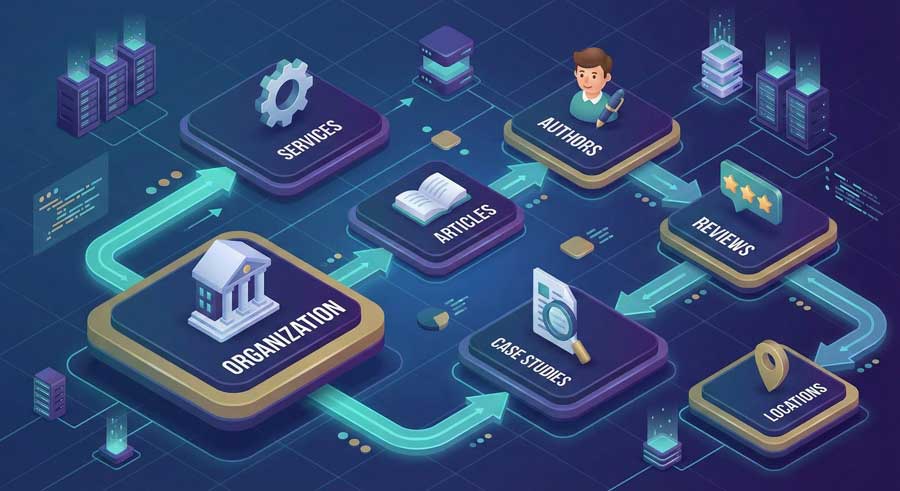
The job now: make this explicit via:
- Information architecture
- Internal linking
- Schema.org JSON‑LD
- Consistent external profiles
Not “we wrote more content”.
5. Step 1 – Define Your Entity Inventory
Before you markup anything, decide what actually exists.
5.1 Core entities almost every brand has
- Organization – single canonical company entity
- People – founders, leadership, SMEs, public-facing experts
- Services – specific offers with clear outcomes
- Products – if you’re selling anything repeatable
- Case Studies / Projects
- Testimonials / Reviews
- Blog Posts / Guides / Resources
- FAQs
- Locations – offices, regions, languages, countries
5.2 High-value optional entities
- Awards / Certifications
- Partnerships / Integrations
- Events / Webinars
- Tools / Frameworks you own
- Media mentions / PR
Put this into a spreadsheet. Example structure:
| Entity Type | Name | URL | Canonical @id | Related Entities | Status |
|---|---|---|---|---|---|
| Organization | Example Digital | / | https://example.com/#org | Services, People, Case Studies | live |
| Service | AI Search & GEO Strategy | /services/ai-search-geo-strategy/ | https://example.com/services/ai-search-geo-strategy/#svc | Org, Blog Posts, Case Studies | live |
| Person | Jane Smith | /team/jane-smith/ | https://example.com/#person-jane-smith | Org, Articles, GEO Strategy | live |
| CaseStudy | B2B SaaS AI Overview Wins | /case-studies/b2b-saas-ai-overview-wins/ | https://example.com/case-studies/b2b-saas-ai/#case | Org, GEO Strategy Service, SaaS vertical | draft |
If you can’t list your entities, you can’t build a graph. You’re still in brochure mode.
6. Step 2 – Architect Your Brand Ecosystem
Now you turn “list of things” into structured relationships.
6.1 Top-level relationships
These are the big ones:
- Organization → offers → Services
- Organization → employs → People
- Organization → hasPart → Blog, Resources, Case Studies, Docs
- Organization → has → Locations
- Organization → hasReview / aggregateRating → Reviews
6.2 Cluster-level relationships
For each Service:
- Service → isProvidedBy → Organization
- Service → hasPart → Articles / Guides / FAQs
- Service → subjectOf → Case Studies
- Service → isRelatedTo → Industries / Use cases
For each Case Study:
- CaseStudy → about → Service
- CaseStudy → provider → Organization
- CaseStudy → mentions → Client type, vertical, tech stack
For Content (Blog posts, Guides):
- BlogPosting → about → Service / Topic
- BlogPosting → author → Person
- BlogPosting → mentions → Tools, frameworks, partner brands
6.3 Authority layer: People as nodes
For People:
- Person → worksFor → Organization
- Person → jobTitle → Role
- Person → knowsAbout → Topics
- Person → author → Articles
- Person → sameAs → LinkedIn, X, personal site
By the end of this, you should be able to answer:
“If I deleted all my page layouts and only left entities + relationships,
would a machine still understand who we are and what we do?”
If not, keep mapping.
7. Step 3 – Build Your Schema Graph (JSON‑LD)
Now we encode the model.
The shared vocabulary here is Schema.org. For a deeper dive into the ecosystem, the official docs at Schema.org Documentation are worth skimming.
All examples below use JSON‑LD inside <script> tags.
7.1 Organization schema
Put a single canonical Organization (or LocalBusiness) entity on your root and/or About page.
<script type="application/ld+json">
{
  "@context": "https://schema.org",
  "@type": "Organization",
  "@id": "https://example.com/#org",
  "name": "Example Digital",
  "url": "https://example.com/",
  "logo": "https://example.com/logo.png",
  "description": "GEO-first digital consultancy helping brands win in AI search.",
  "sameAs": [
    "https://www.linkedin.com/company/example-digital",
    "https://x.com/exampledigital"
  ],
  "founder": {
    "@type": "Person",
    "@id": "https://example.com/#person-founder"
  },
  "areaServed": "Global"
}
</script>
For Google’s official take on organization markup, see:
Organization structured data
7.2 Service schema
Each service should be its own Service entity on its own URL.
<script type="application/ld+json">
{
  "@context": "https://schema.org",
  "@type": "Service",
  "@id": "https://example.com/services/ai-search-geo-strategy/#service",
  "name": "AI Search & GEO Strategy",
  "description": "Design and deploy AI-first search architectures that rank in AI Overviews, AI Mode, and answer engines.",
  "provider": {
    "@type": "Organization",
    "@id": "https://example.com/#org"
  },
  "serviceType": "SEO, GEO, AI Search",
  "areaServed": "Global"
}
</script>
7.3 Person schema
Define people once and reuse them everywhere.
<script type="application/ld+json">
{
  "@context": "https://schema.org",
  "@type": "Person",
  "@id": "https://example.com/#person-jane-smith",
  "name": "Jane Smith",
  "jobTitle": "Head of GEO Strategy",
  "worksFor": {
    "@type": "Organization",
    "@id": "https://example.com/#org"
  },
  "sameAs": [
    "https://www.linkedin.com/in/jane-smith-geo"
  ],
  "knowsAbout": [
    "AI search",
    "knowledge graphs",
    "GEO"
  ]
}
</script>
7.4 Blog post schema as part of the graph
Your blog posts should plug into the graph, not float as isolated content islands.
<script type="application/ld+json">
{
  "@context": "https://schema.org",
  "@type": "BlogPosting",
  "@id": "https://example.com/blog/ai-knowledge-graph-playbook/#article",
  "headline": "The AI Knowledge Graph Playbook",
  "description": "How to build a machine-readable brand ecosystem for AI search.",
  "author": {
    "@type": "Person",
    "@id": "https://example.com/#person-jane-smith"
  },
  "about": [
    {
      "@type": "Service",
      "@id": "https://example.com/services/ai-search-geo-strategy/#service"
    }
  ],
  "publisher": {
    "@type": "Organization",
    "@id": "https://example.com/#org"
  },
  "datePublished": "2025-12-09",
  "mainEntityOfPage": {
    "@type": "WebPage",
    "@id": "https://example.com/blog/ai-knowledge-graph-playbook/"
  }
}
</script>
7.5 Case study schema (massively underrated)
Case studies are credibility bombs. Treat them that way.
<script type="application/ld+json">
{
  "@context": "https://schema.org",
  "@type": "CaseStudy",
  "@id": "https://example.com/case-studies/b2b-saas-ai-overview-wins/#case",
  "name": "B2B SaaS AI Overview Wins",
  "description": "How we increased AI Overview presence for a B2B SaaS brand using a GEO-native knowledge graph.",
  "about": {
    "@type": "Service",
    "@id": "https://example.com/services/ai-search-geo-strategy/#service"
  },
  "provider": {
    "@type": "Organization",
    "@id": "https://example.com/#org"
  }
}
</script>
Now you’ve got:
- A single org
- Concrete services
- Real people
- Content tied to services
- Proof (case studies) tied to services and org
That’s a graph, not just “we added schema”.
8. Step 4 – Build Knowledge‑Dense Entity Hubs
Next, you need hub pages whose entire job is to define entities clearly.
Typical hubs:
/or/about– Organization hub/team– People hub/services– Service index hub/services/[service]– Service hubs/case-studiesand/case-studies/[slug]– Case study hubs/blogor/resources– Content hubs
Each hub should:
- Explain the entity in clear, non-fluffy language
- Include appropriate JSON‑LD for that entity
- Link to related entities (parents, children, siblings)
- Use multimodal assets (images, diagrams, possibly short video) with descriptive filenames and alt text
Think of these like Wikipedia pages for your brand, but on your own domain.
If your “Services” page is just a grid of vague cards like “Innovate”, “Transform”, and “Evolve”… yes, you are making life difficult for everyone.
9. Step 5 – Build External Trust Nodes (Off‑Site Graph)
Your on-site graph is only half of what AI looks at.
Systems like Google’s Knowledge Graph and commercial LLMs also lean heavily on off-site signals:
- Google Business Profile (if you have physical presence)
- LinkedIn company page
- Crunchbase / PitchBook (for startups / product companies)
- GitHub / Product Hunt / app stores (for tools & SaaS)
- Industry directories and associations
- Podcasts, interviews, guest posts, conference talks
- High-quality mentions on niche sites
Minimum external graph hygiene:
- Same brand name everywhere
- Same canonical website URL
- Matching descriptions (no split personality branding)
- Consistent logo / mark
- Links back to your site from major profiles
sameAspointing to those profiles in your Organization schema
If LinkedIn says you’re “AI strategy consultants”, your homepage says you’re “creative performance marketers”, and Crunchbase says you’re “data integration middleware”, don’t be surprised when AI has no idea what box to put you in.
10. Step 6 – Build Multimodal Graph Assets
AI systems aren’t just consuming text. They’re interpreting images, videos, and documents as part of the knowledge graph.
For each major service or topic, aim to have:
Images
- Custom diagrams (system architecture, process flows)
- Before/after visuals
- Filenames and alt text that reflect entities and relationships
Video
- Short explainers for key services or case studies
- Titles and descriptions that mention your org, service, and target use case
- Optional
VideoObjectmarkup where it matters
Documents / Data
- PDFs, whitepapers, or datasets with proper titles and metadata
- If you’re publishing data, look at Google’s
Datasetstructured data:
The point isn’t “do video because marketing said so”. The point is:
“Give AI more high-confidence, structured signals that reinforce
who we are, what we do, and where we’re credible.”
11. Step 7 – Connect Everything into a Unified Graph
Now you wire the whole thing together.
11.1 Pick stable @id patterns
Choose a convention and stick with it:
- Organization:
https://example.com/#org - Person:
https://example.com/#person-[slug] - Service:
https://example.com/services/[slug]/#service - Case Study:
https://example.com/case-studies/[slug]/#case
Changing IDs casually is basically deleting and recreating entities in the graph. Don’t do that unless you enjoy starting from zero.
11.2 Validate aggressively
Use:
- Schema Markup Validator
- Google’s structured data docs and testing tools:
Check for:
- Multiple
Organizationentities for the same brand - Invalid or missing relationships (
authorpointing to plain text instead of aPerson, etc.) - Types that don’t match content (e.g., calling a service a
Productjust to get a rich result)
11.3 Sanity-check with an LLM
Practical trick:
- Copy the JSON‑LD from a key page.
- Drop it into an LLM with:
“List all entities in this schema and explain how they relate.”
- If the explanation doesn’t match how your business actually works, your graph is still confusing.
If a general-purpose model can’t understand your schema, it’s optimistic to assume Google’s stack magically will.
12. Step 8 – Maintain Data Freshness
AI systems are biased towards current, trustworthy data.
AI Overviews are continuously updated and expanded, and Google’s docs emphasize that they pull from current, relevant sources rather than static snapshots. Same story with AI Mode: answers evolve as the index and systems update.
Treat your knowledge graph like a product, not a one‑off project.
12.1 A realistic freshness cycle
Weekly
- Add schema to any new content.
- Link new posts to relevant services, people, and case studies.
Monthly
- Review top service pages and case studies for outdated claims, pricing, or screenshots.
- Update key facts and, when the changes are material, update
dateModifiedin your schema.
Quarterly
- Audit for duplicate or obsolete entities.
- Clean up broken outbound links and stale
sameAsreferences. - Align external profiles (LinkedIn, GBP, Crunchbase, etc.) with how you currently position yourself.
This is “maintenance mode” for your graph. Neglect it and your representation decays.
13. Step 9 – Avoid Graph‑Killing Mistakes
Here’s where most brands blow it.
Multiple Organization entities
- One brand, one canonical
Organizationnode. More than that, and you dilute identity.
- One brand, one canonical
Duplicate people
- “Jane Smith”, “Jane S.”, “J. Smith” each with their own
@id. Congratulations, you just invented three authors.
- “Jane Smith”, “Jane S.”, “J. Smith” each with their own
Inconsistent naming for the same thing
- “AI SEO Strategy”, “LLM Search Consulting”, and “GEO Program” all describing the same service but modeled as different entities.
Service pages with no internal links
- If a core service isn’t linked from nav, homepage, and relevant posts, it’s an orphan, not a hub.
Schema without relationships
- Marking everything up as
BlogPostingwith noabout,author, or ties back toOrganizationandService.
- Marking everything up as
Auto-generated junk schema
- Plugins that output conflicting or invalid structured data.
- If you don’t understand what your tools are emitting, you’re one update away from tanking eligibility.
Out-of-sync external profiles
- Brand position pivoted; LinkedIn and Crunchbase didn’t get the memo. AI doesn’t know which version of you to trust.
Don’t optimize your site and then let a schema plugin spray nonsense all over it.
14. A Simple Before/After Graph Example
Anonymized but very real.
Before
- 130+ blog posts, mostly generic TOFU content
- 10 service pages with overlapping positioning
- No Person schema
- Minimal Organization schema, no
sameAs - No case studies
- Rarely surfaced in AI Overviews, even on questions highly aligned with their services
After a targeted graph rebuild
- Defined 1 Organization, 7 core Services, 6 key People
- Created 8 case studies, each linked to a specific service and industry
- Added clean JSON‑LD for Organization, Person, Service, BlogPosting, CaseStudy
- Normalized naming and descriptions across the site and LinkedIn / GBP
- Shifted internal links so service hubs became real centers of gravity
Results over ~6 months
- Consistent inclusion in AI Overviews for niche, high‑intent queries in their vertical
- Noticeable uptick in impressions where their brand appears inside multi-source answers
- Higher quality leads mentioning “we saw you in Google’s AI results”
No tricks. Just clarity + consistency.
15. Build vs. Buy: How Much of This Should You Own?
15.1 You can (and should) own the fundamentals
Build in‑house if:
- You have devs comfortable editing templates/components
- Marketing is willing to learn structured data basics
- You accept an iterative approach (v1 is allowed to be imperfect)
Useful resources:
- Intro to structured data – Google Search Central
- Structured data in Google Search
- Schema.org for Developers
15.2 When to bring in GEO / entity specialists
It’s worth getting help when:
- You’re in a highly competitive vertical (finance, health, B2B SaaS, enterprise)
- You already have significant traffic and can’t afford “schema experiments” that break things
- You want a GEO-native architecture designed specifically for AI Overviews, AI Mode, and answer engines
- You want to roll out a consistent graph across multiple properties (main site, docs, support, academy, etc.)
In those cases, what you’re buying is:
- A coherent entity model
- Robust schema patterns
- A measurement framework for AI visibility
Not “more blog posts”.
16. A 30‑Day Brand Knowledge Graph Plan
Here’s a realistic 30‑day rollout that doesn’t require a full rebuild.
Week 1 – Inventory & Architecture
- Build your entity inventory (Org, People, Services, Case Studies, Locations, Content).
- Decide on
@idconventions. - Map relationships: Org → Services → Content → People → Proof (reviews/case studies).
Week 2 – Hubs & Core Schema
- Create or refine entity hubs: homepage, About, Services index, key Service pages, Team page.
- Implement Organization, Person, and Service schema on the right pages.
- Normalize naming and positioning across on-site copy and nav.
Week 3 – Wiring & External Graph
- Add
BlogPostingschema to important articles and connect them to Services and Authors. - Fix internal links so entity hubs sit at the center of their clusters.
- Clean up and align external profiles (LinkedIn, GBP, Crunchbase, GitHub, etc.).
- Add
sameAsreferences from your Organization schema to those profiles.
Week 4 – Proof, Multimodal & Audit
- Publish at least 3–5 case studies for core services and mark them up as
CaseStudy. - Add/upgrade images and diagrams on hubs with sensible filenames and alt text.
- Validate all schema with Schema Markup Validator.
- Fix errors, remove duplicate entities, ensure
@ids are consistent.
By the end of 30 days, you don’t just have “more content”.
You have a brand knowledge graph that AI systems can reliably use.
17. Closing: A Machine‑Readable Brand Outperforms a Human‑Readable One
Humans skim.
AI parses.
If your brand is just a pile of well-written pages, you’re optional.
If your brand is a coherent, machine-readable graph, you’re reusable.
In an AI‑first search world, that’s the real ranking factor.
Build a knowledge graph that:
- States clearly who you are
- Shows what you do and for whom
- Proves it with cases and signals
- Connects everything on‑site and off‑site
Then, when AI Overviews, AI Mode, and answer engines go looking for sources, your brand isn’t just another URL.
It’s part of the infrastructure of the answer.
Applied Playbooks by Vertical
- GEO for Dental Clinics: The 9-Entity Setup — the exact entity graph we deploy for dental practices
- 100 Toronto Law Firms Audited: Only 12 Appear in ChatGPT — data-driven analysis of knowledge graph gaps in legal
- Schema Markup for AI: JSON-LD Templates — copy-paste templates for the schema layer
Further Reading (Optional, but Actually Worth Clicking)
- Google: Intro to structured data
- Google: AI Overviews help page
- Google: AI Overviews global expansion
- Google: AI Mode in Search
- Google: How AI Overviews in Search work (PDF)
- Schema.org: Schema.org for Developers
- SEJ: How to measure AI Overview impressions
- Search Engine Land: AI Overviews → AI Mode behavior